
Ransomware attacks have changed how organizations think about disaster recovery. In the past, restoring from backup was usually enough to resume operations. Today, attackers often compromise entire systems, infrastructure, and even backup environments themselves.
As a result, many organizations have discovered that restoring systems directly back into production environments can reintroduce malware and restart the attack cycle.
To address this risk, enterprises are increasingly adopting cleanroom recovery—a secure, isolated approach to restoring systems after a cyberattack
The registry is used as a critical tool for attackers to maintain control over a system.
of all resident malware adds itself to “Run” keys so it restarts every time you boot your PC.
of enterprise attacks use scripts or shellcode in “hidden” keys, allowing the virus to run entirely in your computer’s RAM.
Mandiant (Google Cloud Threat Intelligence) highlights that modern ransomware attacks now target both production and backup environments, meaning recovery must evolve beyond simple restore – Isolated Recovery Environments: A Critical Layer in Modern Cyber Resilience
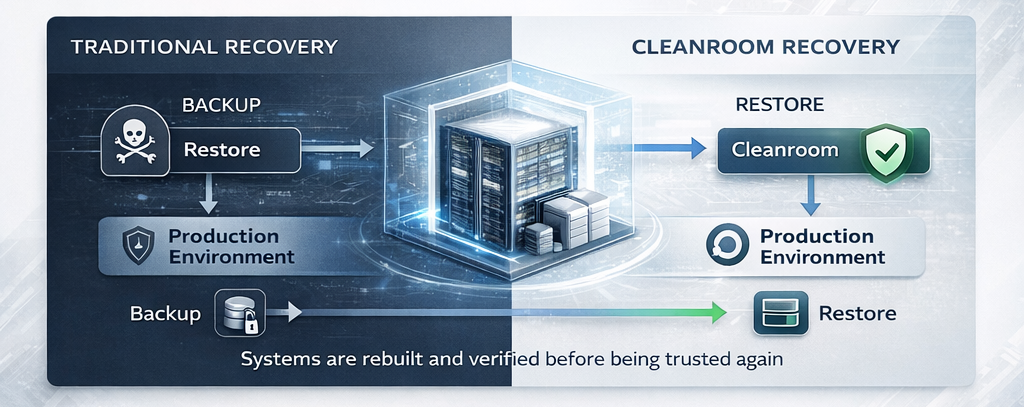
Cleanroom recovery is a cybersecurity and disaster recovery approach that restores systems within an isolated recovery environment before returning them to production.
This isolated environment allows organizations to:
In simple terms, a cleanroom recovery environment acts like a quarantine zone for system restoration.
Systems are rebuilt and verified in the cleanroom before being trusted again in the production network.
Systems are restored into a virtual, isolated Clean Room environment.
✅
Automated and manual testing is performed to check for system integrity, malware remnants, or misconfigurations.
✅
Once verified, the systems are migrated back to the production environment, or transitioned into a new clean production state.
✅
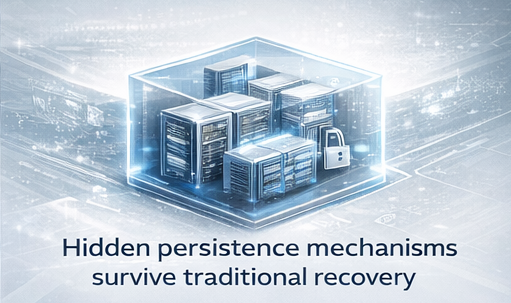
Modern ransomware attacks often leave behind hidden persistence mechanisms designed to reinfect systems.
Attackers may:
If systems are restored directly from backup without verification, these hidden elements can remain active.
This can lead to:
Cleanroom recovery reduces this risk by ensuring systems are validated in isolation before returning to production.
| Traditional Disaster Recovery | Cyber Recovery |
|---|---|
|
Focuses on system failures |
Focuses on malicious attacks
|
|
Restores data and systems |
Restores systems securely |
|
Assumes infrastructure is trustworthy |
Assumes infrastructure is trustworthy |
|
Minimal validation |
Extensive validation required |
A cleanroom recovery process typically follows several stages.
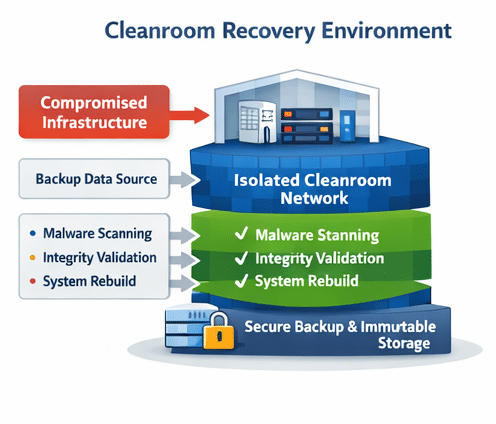
A secure environment is created that is completely separate from the compromised network.
This environment may include:
Isolation ensures that malware cannot spread during restoration.
Compromised servers are rebuilt using trusted backup data and system images.
This process may involve restoring:
Technologies such as bare metal recovery can accelerate this stage by restoring complete systems automatically.
Before systems are returned to production, security teams validate that restored systems are safe.
Verification may include:
This step ensures that restored systems are clean and trustworthy.
Once verification is complete, systems can be safely reintegrated into the production environment.
This controlled approach significantly reduces the risk of reinfection.
Backups that once written cannot be altered in any way.
A security framework based on the principle of “never trust, always verify”.
An integrated security solution that continuously monitors end-user devices to detect, investigate, and automatically respond to advanced cyber threats that traditional antivirus software might miss.
The comprehensive strategy for restoring full IT operations after a major catastrophe.
Automated recovery dramatically reduces system rebuild time.
Organizations that restore systems directly from backup without isolation face several risks.
Reinfection
Malware hidden within system configurations or scripts may reactivate immediately after restoration.
Incomplete Recovery
Attackers may have modified system configurations or security policies that persist after recovery.
Extended Downtime
If reinfection occurs, organizations may need to repeat the entire recovery process.
Cleanroom recovery helps eliminate these risks by introducing verification and isolation into the recovery workflow.
Cleanroom recovery has become a key component of modern cyber resilience strategies.
Instead of simply restoring data, organizations must ensure that restored systems are secure and trustworthy.
A comprehensive cyber recovery architecture typically includes:
Together, these capabilities allow organizations to recover quickly while maintaining infrastructure integrity.
Restoring systems within a cleanroom environment can be complex, especially when large numbers of servers are involved.
Automation helps organizations rebuild infrastructure faster and more reliably.
Solutions like Cristie Bare Machine Recovery (CBMR) enable organizations to restore complete systems—including operating systems, applications, and configurations—directly from backup data.
This enables rapid infrastructure recovery within secure environments.
Cristie solutions integrate with leading enterprise backup platforms including:
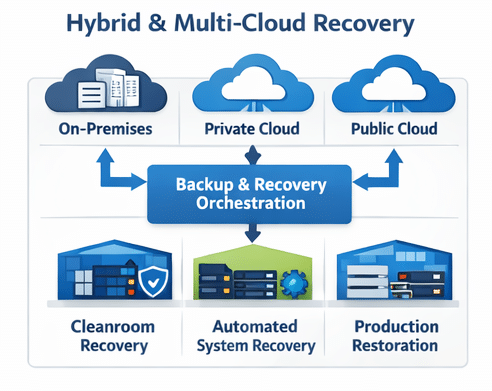
These integrations allow organizations to automate system recovery across physical, virtual, and hybrid cloud environments.
Enterprise IT infrastructure is increasingly distributed across:
Cleanroom recovery architectures must support recovery across these environments.
Modern recovery solutions allow organizations to rebuild systems securely regardless of where workloads run.
This flexibility is critical for maintaining operational continuity in complex infrastructure environments.
Bare metal recovery forms a foundational layer of modern cyber resilience strategies.
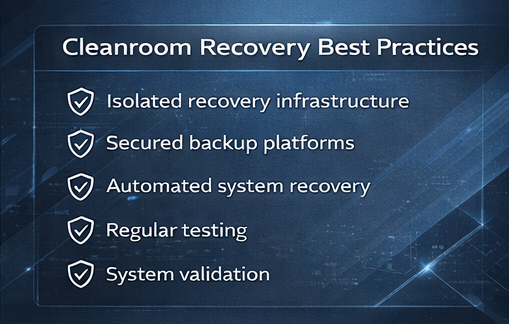
Organizations implementing cleanroom recovery should follow several best practices.
Ensure recovery environments are isolated from production networks.
Backup platforms should be secured using immutability, access controls, and monitoring.
Automation reduces recovery time and minimizes human error.
Recovery environments should be tested frequently to ensure they remain effective.
All restored systems should be verified before returning to production.
As ransomware attacks grow more sophisticated, cleanroom recovery is quickly becoming a standard requirement for enterprise cyber recovery strategies.
Organizations must assume that attackers may have compromised infrastructure deeply.
By restoring systems in a secure, isolated environment, cleanroom recovery provides the assurance that recovered systems are safe, reliable, and ready for production.
Cristie Software helps organizations accelerate secure infrastructure recovery after cyber incidents.
Cristie solutions enable:
These capabilities allow organizations to rebuild infrastructure quickly within secure cleanroom recovery environments, minimizing downtime and strengthening cyber resilience.
Cleanroom recovery is the process of restoring systems in an isolated environment where they can be verified as malware-free before being returned to production.
Ransomware attacks often leave hidden malware or backdoors in compromised systems. Cleanroom recovery prevents reinfection by validating systems before they rejoin the production network.
Traditional disaster recovery restores systems directly into production environments. Cleanroom recovery restores systems in a secure, isolated environment first.
Yes. Cleanroom recovery environments typically integrate with enterprise backup solutions to restore systems securely from trusted backup data.