
A cleanroom recovery architecture is a secure, isolated environment designed to restore and validate compromised systems before returning them to production. It uses network segmentation, controlled access, trusted backup sources, and automated system recovery to ensure restored infrastructure is free from malware and safe to redeploy.
The registry is used as a critical tool for attackers to maintain control over a system.
of all resident malware adds itself to “Run” keys so it restarts every time you boot your PC.
of enterprise attacks use scripts or shellcode in “hidden” keys, allowing the virus to run entirely in your computer’s RAM.
Mandiant (Google Cloud Threat Intelligence) highlights that modern ransomware attacks now target both production and backup environments, meaning recovery must evolve beyond simple restore – Isolated Recovery Environments: A Critical Layer in Modern Cyber Resilience
Most organizations understand the need for isolated recovery. Far fewer know how to design and implement it correctly.
A cleanroom is not just a separate network. It is a controlled recovery system that must:
Without the right architecture, recovery environments can become:
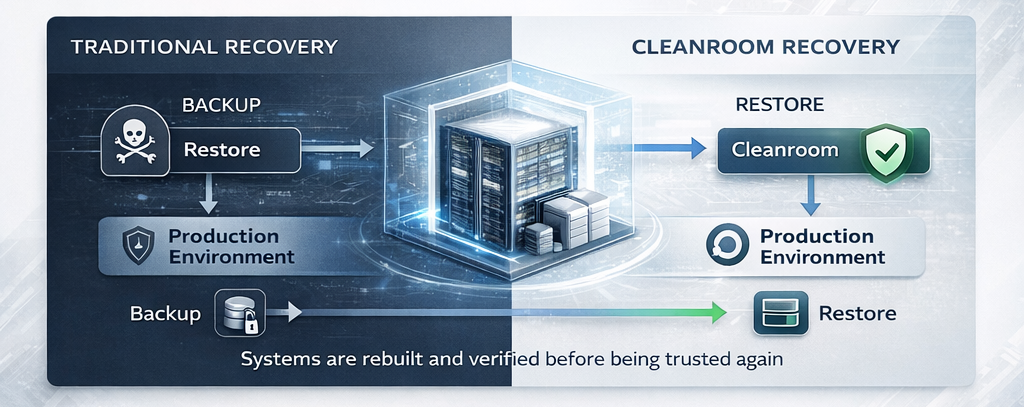
Systems are restored into a virtual, isolated Clean Room environment.
✅
Automated and manual testing is performed to check for system integrity, malware remnants, or misconfigurations.
✅
Once verified, the systems are migrated back to the production environment, or transitioned into a new clean production state.
✅
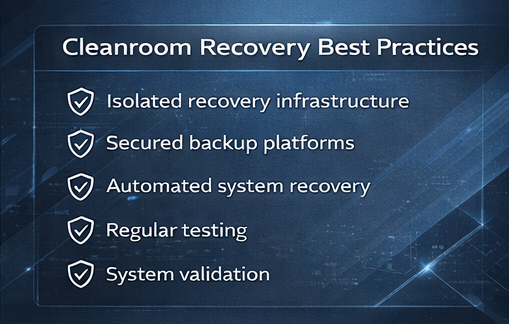
A robust cleanroom recovery architecture is built on five key layers.
The foundation of any cleanroom is complete isolation from production systems.
This can be achieved through:
Key requirement:
👉 No direct trust relationship with compromised systems
Access to the cleanroom must be tightly controlled.
Best practices include:
This prevents attackers from reusing compromised credentials during recovery.
The cleanroom must only ingest verified backup data.
This requires:
Supported enterprise platforms often include:
The goal is to ensure only clean, trusted data enters the recovery environment.
Manual rebuild processes are too slow and error-prone for modern recovery.
Instead, organizations need automated system recovery capabilities that can:
Technologies such as bare metal recovery enable full system restoration directly from backup data, significantly reducing recovery time.
Before systems leave the cleanroom, they must be validated.
Validation should include:
This ensures that systems are not only restored—but safe and operational.
| Traditional Disaster Recovery | Cyber Recovery |
|---|---|
|
Focuses on system failures |
Focuses on malicious attacks
|
|
Restores data and systems |
Restores systems securely |
|
Assumes infrastructure is trustworthy |
Assumes infrastructure is trustworthy |
|
Minimal validation |
Extensive validation required |
Organizations typically implement one of three cleanroom models depending on their requirements.
Model 1: Physically Isolated Cleanroom
Best for:
Model 2: Logically Isolated Cleanroom
Best for:
Model 3: Cloud-Based Cleanroom
Best for:
Backups that once written cannot be altered in any way.
A security framework based on the principle of “never trust, always verify”.
An integrated security solution that continuously monitors end-user devices to detect, investigate, and automatically respond to advanced cyber threats that traditional antivirus software might miss.
The comprehensive strategy for restoring full IT operations after a major catastrophe.
Automated recovery dramatically reduces system rebuild time.
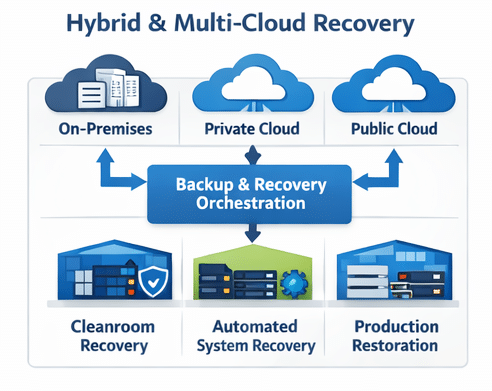
Cleanroom Recovery in Hybrid and Multi-Cloud Environments
Modern IT environments span:
Cleanroom architectures must support recovery across all environments.
Key requirements include:
This ensures organizations can recover workloads regardless of where they run.
Many organizations attempt to implement cleanroom recovery but encounter issues.
Common mistakes include:
❌ Incomplete isolation
❌ Shared credentials with production
❌ Lack of automation
❌ No validation processes
❌ Infrequent testing
These gaps can result in:
Recovery speed is critical during a cyber incident.
To meet enterprise requirements, cleanroom architectures must support:
Automation is the key enabler.
BMR solutions from Cristie, available for Rubrik, Cohesity, Dell Technologies and IBM, or standalone through Cristie Bare Machine Recovery (CBMR) allow organizations to restore entire systems—including operating systems, applications, and configurations—quickly and consistently within isolated environments. Teamed with the Cristie Appliance organizations can fully automate recovery processes to and from any environment.
Cleanroom environments should not be used only during incidents.
Leading organizations are adopting continuous recovery assurance, where:
This transforms cleanroom recovery from a reactive capability into a proactive resilience strategy.
Bare metal recovery forms a foundational layer of modern cyber resilience strategies.
To implement cleanroom recovery effectively, organizations need more than just isolated environments—they need automated, scalable system recovery.
👉 Learn how Cristie enables secure, automated recovery with cleanroom recovery assurance across hybrid environments:
https://www.cristie.com/solutions/clean-room-recovery
A cleanroom recovery architecture is a structured IT environment designed to restore and validate compromised systems in isolation before returning them to production. It combines network segmentation, controlled access, trusted backup integration, and automated recovery processes to ensure systems are secure and free from malware.
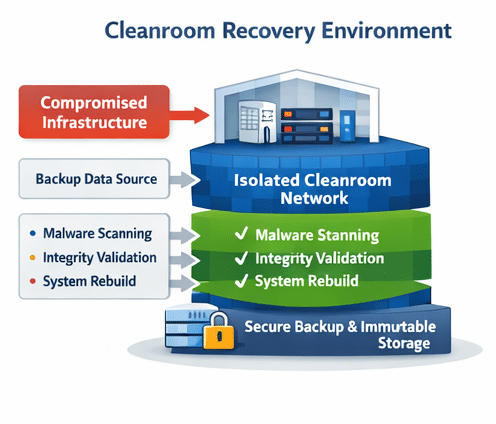
A cleanroom recovery environment typically includes:
Together, these components ensure that only verified systems are returned to production.
Isolation is achieved through:
The goal is to prevent any communication between compromised systems and the cleanroom during recovery.
Automation enables organizations to:
Without automation, recovery can be too slow to meet business continuity requirements.
Backup data is the foundation of system restoration, but it must be:
The architecture must ensure that only clean, uncompromised data is used during recovery.
System validation typically includes:
This ensures that restored systems are safe before being reintroduced to production.
Yes. Modern cleanroom architectures are designed to support:
This allows organizations to recover systems regardless of where workloads are hosted.
Common mistakes include:
These issues can lead to failed recovery or reinfection.
Cleanroom environments should be tested regularly as part of a continuous recovery strategy. Frequent testing ensures that:
Regular testing improves confidence and reduces risk during real incidents.
Cleanroom recovery architecture improves cyber resilience by ensuring that systems are:
This allows organizations to recover quickly while maintaining trust in their infrastructure.