Take greater control of your recovery processes with centralised management, automation and orchestration. Cristie Recovery Hub helps IT teams coordinate large-scale recovery across physical and virtual systems, automate complex recovery processes, test recovery readiness and support secure cleanroom recovery.
Cristie Recovery Hub provides a centralised platform for managing and coordinating recovery across multiple physical and virtual systems, including large-scale automated recovery of physical machines.
Through a single management console, IT administrators can configure recovery operations, import system and network information in bulk, manage boot environments and coordinate recovery across multiple machines. This reduces the manual effort involved in managing recovery across complex IT environments.
Recovery Hub works alongside your existing backup infrastructure and Cristie Recovery Agent. While Recovery Agent provides the core technology for complete system recovery, Recovery Hub adds the automation and orchestration needed to manage recovery at scale. It can also operate independently of Recovery Agent for certain workflows, including virtual machine recovery into an isolated cleanroom environment.
Looking for straightforward system recovery?
If you need to recover individual complete systems without additional management and orchestration capabilities, explore Cristie Recovery Agent.
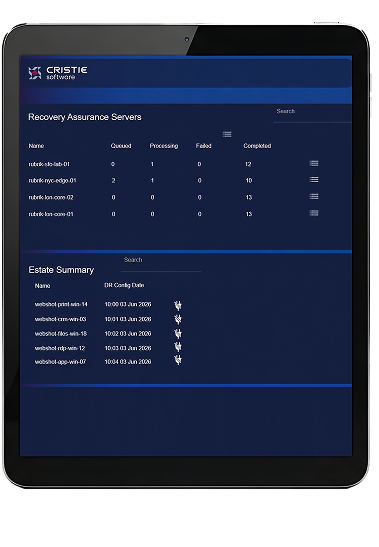
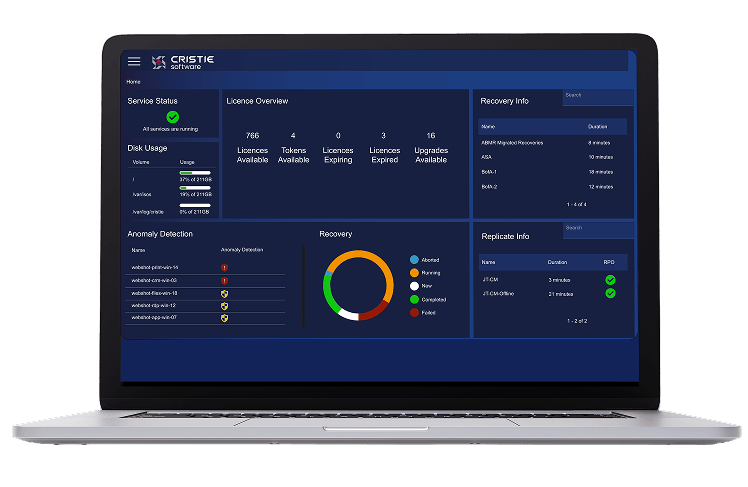
Cristie Recovery Hub brings recovery management, automation and orchestration together in one platform. IT teams can automate recovery workflows, coordinate the sequence in which systems are restored and monitor progress throughout the process.
With less manual intervention and greater visibility, teams can manage complex recovery requirements more efficiently and maintain control when it matters most.
Configure and manage recovery operations across multiple physical and virtual systems from a single console, using bulk configuration and CSV imports to simplify setup at scale.
Reduce repetitive manual tasks through automated recovery processes, including PXE/iPXE boot management to support system recovery.
Define and coordinate recovery sequences across multiple machines, helping teams manage the order in which systems are restored.
Oversee recovery activities across multiple systems, track progress and manage recovery operations from one central location.
Recovering hundreds of physical and virtual systems after a major outage, demonstrating recovery readiness for regulatory compliance or validating potentially compromised systems following a cyber attack all present different challenges.
Cristie Recovery Hub helps organisations prepare for and manage these scenarios, reducing the manual effort involved in large-scale recovery and providing greater confidence that critical systems can be restored when needed.

Coordinate and automate recovery across physical, virtual and cloud environments, reducing manual effort and helping IT teams manage large-scale, complex recovery operations.

Build confidence in your ability to recover with automated recovery testing and validation. Identify potential issues early and provide evidence that critical systems can be restored within required recovery timeframes.

Support ransomware response by recovering systems in a secure, isolated environment. Investigate and validate recovered systems before safely returning them to production, reducing the risk of reintroducing threats.
Recovery management doesn’t stop at the recovery process itself. Cristie Recovery Hub gives IT teams the flexibility to schedule recovery activities, monitor outcomes and access the information they need to stay in control.
With reporting tools and API integration, recovery activities can also be connected to wider IT processes, helping teams manage recovery alongside their existing operations.

Access recovery information and monitor activity across your environment. Keep track of outcomes and gain a clearer understanding of recovery readiness.

Plan and schedule recovery activities to suit your operational requirements, reducing the need for manual intervention and helping teams manage their workloads.

Connect Recovery Hub with other IT systems and operational tools through APIs, allowing recovery activities to form part of your existing workflows.
Assess how Cristie Recovery Hub could fit into your existing IT environment. Explore the system requirements, deployment considerations and technical resources available to help your team evaluate and implement the platform.
Supported operating systems, Recovery Hub infrastructure requirements, compatible backup platforms and network prerequisites.
Deployment options, connections to existing backup infrastructure, PXE/iPXE boot management and configuration for larger environments.
Available API endpoints, authentication requirements, supported integrations and developer documentation.

Faced with the challenge of recovering thousands of physical systems at once, this enterprise organisation needed a fast, scalable approach.
Cristie Bare Machine Recovery (CBMR) enabled more than 8,000 systems to be recovered simultaneously in under four hours, helping restore critical infrastructure at scale.
Find answers to common questions about Cristie Recovery Hub, how it works with Recovery Agent and whether it’s right for your recovery requirements.
Cristie Recovery Agent provides system-level recovery, helping organisations restore operating systems, applications, configurations and data. Cristie Recovery Hub builds on these capabilities by adding centralised management, automation and orchestration, allowing IT teams to coordinate recovery activities across multiple systems and environments.
Yes. Recovery Hub provides a centralised platform for managing recovery across multiple systems, reducing the need to coordinate individual recovery tasks manually. This helps IT teams manage recovery more efficiently, particularly across larger or more complex IT environments.
Recovery Hub supports automated recovery testing, helping organisations verify that critical systems can be restored when needed. Regular testing can help identify recovery issues, reduce uncertainty and provide evidence that recovery processes can meet business continuity requirements.
Yes. Recovery Hub is designed to coordinate recovery across physical, virtual and cloud environments. Its orchestration capabilities help IT teams manage recovery workflows across different infrastructure types, including environments where traditional recovery tools may have limited physical system recovery capabilities.
Yes. Recovery Hub can support recovery following a cyberattack, including ransomware incidents, by helping IT teams coordinate system restoration and recovery validation. It can also support recovery testing in isolated environments, allowing systems to be checked before they are returned to production.
Recovery Hub is designed to work alongside existing backup and recovery technologies, helping organisations extend their recovery capabilities without necessarily replacing their current solutions. Compatibility depends on the technologies and infrastructure in use, so the Cristie team can help assess your specific requirements.
Recovery Hub is particularly relevant for organisations managing recovery across multiple systems, infrastructure types or locations. If your IT team needs greater control over recovery processes, less manual intervention or more consistent recovery testing, Recovery Hub could be a suitable solution. Cristie’s specialists can help assess your environment and recommend the right approach.
Not sure whether Recovery Hub is right for your organisation? Speak to a Cristie specialist about your recovery requirements and explore the options available.
Ready to explore Recovery Hub? Put its capabilities to the test and discover how it could support your organisation’s recovery requirements.
Not sure which recovery solution is right for your organisation? Talk to a Cristie specialist about your IT environment, recovery challenges and the options available.